NanoBox: A Naive Implementation of an AI Sandbox
10 min read
aiserver-asyncopen-sourceFastAPIDockerMCPTools Agents
A while back, for some outside projects, I ended up researching AI sandboxes, the kind where you let an AI deploy web apps, run security tests, and so on. I came across platforms like e2b, OpenAI's Sandbox Agents, or Vercel Sandbox, among others.
Looking at all these platforms I asked myself a question: How do the sandboxes these platforms offer actually work, and how would I build my own?
A sandbox for AI agents is, in essence, an isolated environment (a virtual machine or a container) accessible through tools that the agent can invoke to run commands inside it, while keeping the filesystem state persistent between calls.
Platforms like e2b and Vercel Sandbox are built on the same underlying technology: Firecracker microVMs, because they need stronger isolation when running untrusted code, whether it comes from AI agents or from users.
Why use microVMs instead of containers? Because with microVMs the kernel isn't shared with the host machine. Traditional containers (Docker, containerd, etc.) do share it, which reduces isolation. Firecracker is also fast: boot times of up to 125 milliseconds and less than 5 MiB of memory overhead per microVM, which lets you spin up sandboxes almost instantly.
Now that we understand roughly how sandboxes work on these platforms, we can start picturing how to implement our own solution. I'm going to build a naive implementation of these sandboxes, that is, the direct, basic, and simple solution to the problem.
Before trying to build anything, it's important to understand clearly how my AI agents are going to interact with my sandboxes, because this can save us a lot of over-engineering. AI agents will interact through tools, either tools native to the agent or tools exposed through an MCP server. The interaction itself follows a query-response structure, so real-time communication isn't needed.
This framing already simplifies the sandbox architecture quite a bit.
Since I don't need kernel-level isolation (the agent is going to be running relatively safe things) and library integration was much more accessible than with Firecracker, I decided to go with Docker.
Docker handles creating the containers that act as the sandbox for the AI. A Docker container's writable layer persists as long as you don't delete it, so basic filesystem persistence comes solved out of the box, though without the snapshot/restore mechanism that Firecracker offers.
Another decision was to make the sandboxes completely ephemeral: when a sandbox is created, it has a fixed lifetime (half an hour in my case) and is destroyed afterward.
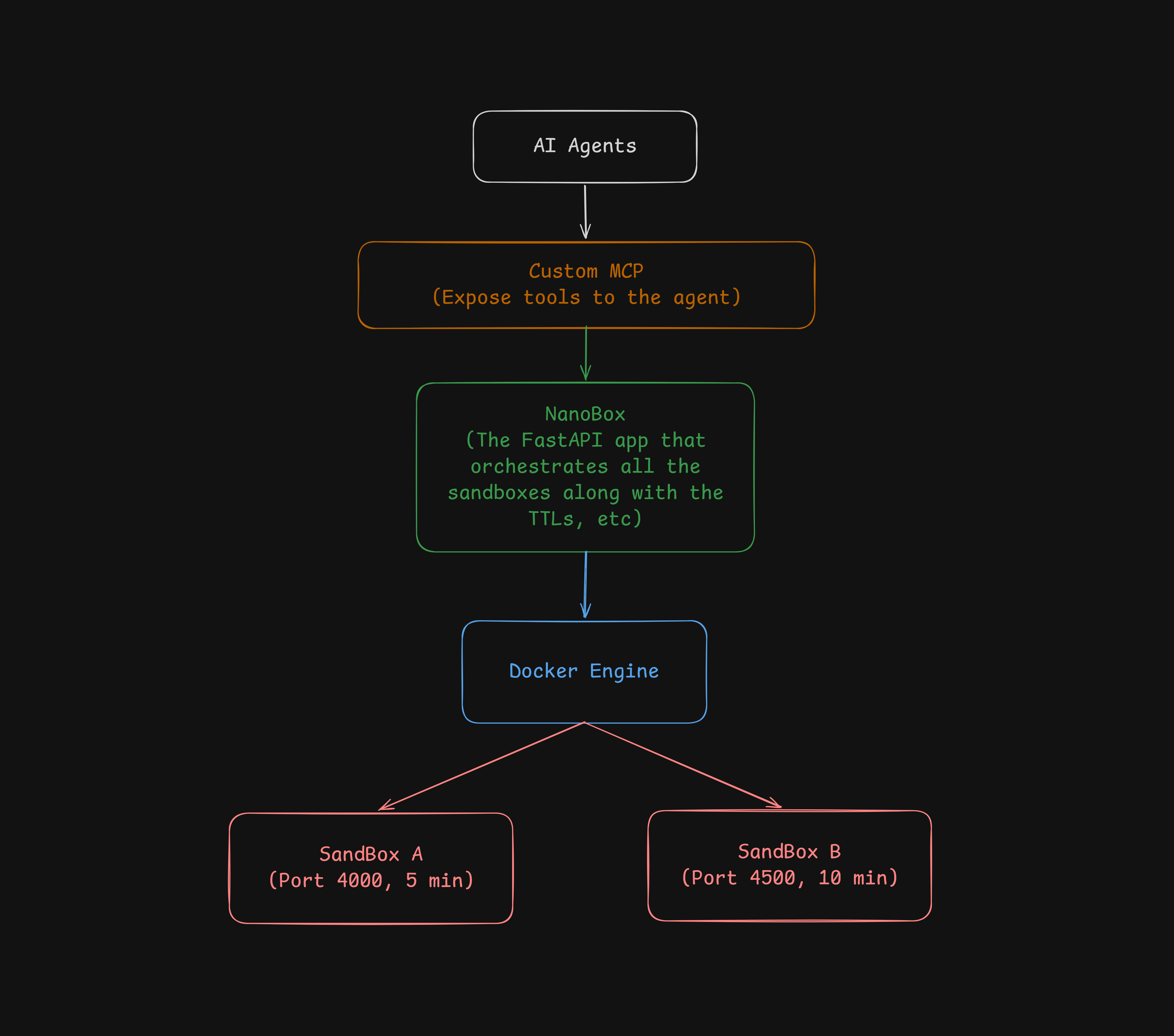
Port opening follows the same philosophy, but with its own independent lifecycle: each port is opened with its own TTL, defined at the moment it's requested. For example, I can open port 4000 on sandbox A for 5 minutes, and port 4500 on sandbox B for 10 minutes, each expiring on its own without depending on the TTL of the container hosting it.
For a naive implementation, keeping everything disposable is quite a bit simpler than maintaining persistent sandboxes and ports: there's no manual cleanup to worry about, no resource leaks, and no need to sync state across long sessions.
With these pieces defined, here's what the full architecture looks like: the agent talks to a custom MCP server, which exposes the tools to a FastAPI app, which in turn orchestrates the Docker engine and the sandboxes it creates.
We create a sandbox (a container) from my own f4k3r22/nanobox image, based on debian:bookworm-slim with a few extra dependencies, to make integration with the agent faster and easier. Memory and CPU limits were also added, so that even if the agent runs heavy workloads, the container doesn't slow down or lock up the host machine.
MEMORY_LIMIT = 256 * 1024 * 1024NANO_CPUS = 500_000_000SANDBOX_IMAGE = "f4k3r22/nanobox"
async def createSandboxContainer(docker: aiodocker.Docker, sandboxId: str): config = { "Image": SANDBOX_IMAGE, "Cmd": ["sleep", "infinity"], "HostConfig": { "Memory": MEMORY_LIMIT, "NanoCpus": NANO_CPUS, }, } container = await docker.containers.create_or_replace( config=config, name=f"sandbox-{sandboxId}" ) await container.start() return containerTo handle both the sandbox limits and the execution of commands inside them, the SandboxSession class was created, which implements:
runCommand(self, ...): runs commands inside the container.isExpired(self): checks whether the session has already expired.destroy(self): destroys the container.SANDBOX_TTL_SECONDS = 30 * 60
class SandboxSession: def __init__(self, sandboxId: str, container: DockerContainer): self.sandboxId = sandboxId self.container = container self.lock = asyncio.Lock() self.createdAt = time.monotonic()
async def start(self): pass
async def runCommand(self, command: str, timeout: float = 30.0): async with self.lock: execInstance = await self.container.exec( cmd=["/bin/sh", "-c", command], stdout=True, stderr=True, tty=False, )
output = b"" try: async with execInstance.start(detach=False) as stream: while True: message = await asyncio.wait_for(stream.read_out(), timeout=timeout) if message is None: break output += message.data except asyncio.TimeoutError: logger.error(f"Command in sandbox {self.sandboxId} exceeded timeout of {timeout}s") return {"output": output.decode(errors="replace"), "exit_code": None, "timed_out": True}
info = await execInstance.inspect() return { "output": output.decode(errors="replace"), "exit_code": info["ExitCode"], "timed_out": False, }
def isExpired(self) -> bool: return (time.monotonic() - self.createdAt) > SANDBOX_TTL_SECONDS
async def destroy(self): try: await self.container.delete(force=True) except Exception as e: logger.error(f"Error deleting sandbox container {self.sandboxId}: {e}")Alongside this, in the main FastAPI app, inside the lifespan we call a reaperLoop(...) function. This checks every 60 seconds whether any container has already expired within the sessions dictionary, which is where we keep track of all active sessions. If a session has expired, it destroys it.
sessions: dict[str, SandboxSession] = {}
REAPER_INTERVAL_SECONDS = 60
async def reaperLoop():    while True:        await asyncio.sleep(REAPER_INTERVAL_SECONDS)        expiredIds = [sid for sid, s in sessions.items() if s.isExpired()]        for sandboxId in expiredIds:            session = sessions.pop(sandboxId)            logger.info(f"Sandbox {sandboxId} expired, removing container")            await session.destroy()
@asynccontextmanagerasync def lifespan(app: FastAPI):    app.state.docker = aiodocker.Docker()    reaperTask = asyncio.create_task(reaperLoop())    yield    reaperTask.cancel()    for session in sessions.values():        await session.destroy()    await app.state.docker.close()
app = FastAPI(title="NanoBox", lifespan=lifespan)
With all this in place, we create the endpoints for creating a sandbox and running commands.
@app.post("/sandbox")async def createSandbox():    sandboxId = str(uuid.uuid4())    container = await createSandboxContainer(app.state.docker, sandboxId)
    session = SandboxSession(sandboxId, container)    await session.start()    sessions[sandboxId] = session
    return {"sandboxId": sandboxId}
@app.post("/sandbox/{sandboxId}/exec")async def execCommand(sandboxId: str, body: CommandRequest):    session = sessions.get(sandboxId)    if session is None:        raise HTTPException(status_code=404, detail="sandbox not found")
result = await session.runCommand(body.command, timeout=body.timeout) return resultDocker doesn't natively support exposing ports dynamically while a container is running. Ports are defined when the container is started, typically through a file like docker-compose.yaml or the -p flag on docker run.
While researching this, I found there's still a way to do it: using socat together with the internal IP the container is running on. That led me to build these two functions: one to get the container's IP, and another to ephemerally expose the port to the host machine.
async def getConteinerIP(conteinerName: str) -> str | None:    docker = aiodocker.Docker()    try:        container = await docker.containers.get(conteinerName)        info = await container.show()        networks = info["NetworkSettings"]["Networks"]        for red in networks.values():            return red["IPAddress"]        return None    finally:        await docker.close()
async def openEphemeralPort(hostPort: int, containerIP: str, containerPort: int, duration: int) -> int:    proceso = await asyncio.create_subprocess_exec(        "socat",        f"TCP-LISTEN:{hostPort},fork,reuseaddr",        f"TCP:{containerIP}:{containerPort}",        stdout=asyncio.subprocess.DEVNULL,        stderr=asyncio.subprocess.PIPE,    )
    logger.info(f"Port {hostPort} opened to {containerIP}:{containerPort} for {duration}s")
    async def drainStderr():        assert proceso.stderr is not None        data = await proceso.stderr.read()        if data:            logger.error(f"socat on port {hostPort} wrote to stderr: {data.decode(errors='replace').strip()}")
    stderrTask = asyncio.create_task(drainStderr())
    try:        await asyncio.wait_for(proceso.wait(), timeout=duration)
        if proceso.returncode != 0:            logger.error(f"socat on port {hostPort} exited with code {proceso.returncode} before timeout")
    except asyncio.TimeoutError:        proceso.terminate()
        try:            await asyncio.wait_for(proceso.wait(), timeout=5)
        except asyncio.TimeoutError:            logger.error(f"socat on port {hostPort} did not terminate, forcing kill")            proceso.kill()            await proceso.wait()
    finally:        stderrTask.cancel()        logger.info(f"Port {hostPort} closed")
    return proceso.returncode
Alongside this, the endpoint to open an ephemeral port was created.
runningForwards: set[asyncio.Task] = set()
def _logTaskFailure(task: asyncio.Task):    runningForwards.discard(task)    if task.cancelled():        return    exc = task.exception()    if exc:        logger.error(f"Ephemeral port task {task.get_name()} failed: {exc}")
@app.post("/sandbox/{sandboxId}/ephemeralport")async def openPort(sandboxId: str, body: PortReq):    session = sessions.get(sandboxId)    if session is None:        raise HTTPException(status_code=404, detail="sandbox not found")
    containerName = f"sandbox-{sandboxId}"    ipSand = await getConteinerIP(containerName)
    if ipSand is None:        raise HTTPException(status_code=500, detail="could not resolve container IP")
    if not checkPort("0.0.0.0", body.hostport):        raise HTTPException(status_code=409, detail=f"host port {body.hostport} already in use")
    task = asyncio.create_task(        openEphemeralPort(body.hostport, ipSand, body.sandboxport, body.duration)    )
    runningForwards.add(task)    task.add_done_callback(_logTaskFailure)
    host = await getLANIp()
    return {        "host": host,        "hostport": body.hostport,        "duration": body.duration,    }
Now that NanoBox is implemented, we need to connect it to the AI harness. For this I decided to go with an MCP and connect it to Claude Code. After that, I added it to Claude Code with this:
claude mcp add nanobox -- python mcp/main.pyEven though NanoBox fulfills what it set out to be as a naive implementation, it's still a very limited solution. The most important point is isolation: by using containers instead of microVMs like Firecracker, NanoBox shares a kernel with the host machine, something platforms like e2b or Vercel Sandbox avoid by design. For running truly untrusted code, that difference matters.
On top of that, smaller gaps kept showing up during the implementation: race conditions when opening ports, error handling that's almost nonexistent in the endpoints, and no real recovery strategy if the FastAPI process crashes while sandboxes are still active. None of this is hard to fix, but it isn't fixed today either, and it's worth stating that clearly instead of leaving it implicit.
That said, the goal was never to build a replacement for e2b or Vercel Sandbox, but to understand firsthand what problem they solve and how far you can get with a simple approach. In that sense, NanoBox delivered: today I have a working sandbox, with real TTLs and ephemeral ports, running with my own agents. The full code is in the repo, for anyone who wants to see the rest of the implementation or improve it.